
 Asking for help is something everyone does. But when you ask for help, someone else is giving you their time and attention, a finite resource. If you put yourself in the shoes of the person helping you and make it as easy as possible for them, you’ll get better help faster. This post is geared towards getting help with problems in software development and operations, but most of the advice applies broadly.
- Ask AI First
- Search for Solutions
- Communicate the Problem
- Provide Context
- Isolate the Problem
- Solve the Problem Loudly
- Related Work
- Coda
Ask AI First
Before asking a human, try an AI (e.g. ChatGPT, Claude, Gemini). For well-defined problems with known solutions, it’s is fast and available 24/7. Reserve human help for context-heavy, relationship-specific, or genuinely novel problems where lived experience and judgement matter.
Give the AI the same quality of context you’d give a human. A vague prompt gets a vague answer. A specific, well-framed question with relevant details gets a useful one. The sections below apply equally to prompting a Gen AI as they do to asking a colleague.
Search for Solutions
Maybe it goes without saying but searching for a solution yourself is a must.
Try to find a unique string in any error messages you’re getting and use that in your search terms.
Some targets for your search:
- source code if it’s available
- product documentation
- chat history (Slack/Teams/IRC)
- good ol’ stackoverflow.com
- good ol’ google.com
Communicate the Problem
In Public
I’m passionate about sharing knowledge and problem solving in public is an essential piece of that.
If someone asks me for help in a direct message (DM) in chat, I often reply like this.
Please ask these kinds of questions in a public channel (like #X or #Y) and I’ll answer you there. That way the knowledge is shared widely, more people get on the same page, and it gives others the chance to chip in with answers.
Always encouraging people to ask questions in public normalises the behaviour and works to remove any stigma associated with seeking help publicly. If you need help with something, there’s an excellent chance someone else needs that exact same help. In my opinion, confining the help to DMs hinders the growth of the person and the organisation as a whole.
That’s my general rule of thumb. However, if there are people who will only ask for help in private or not at all then of course go ahead and help them in private. Continue to encourage them to open up for their own benefit and the benefit of everyone else.
And if the same problem requires help time and time again, it’s probably time to document it or solve the problem permanently!
Shorten the Feedback Loop
Every round trip costs time, yours and theirs. When you ask a question, ask yourself: what will the helper ask next? Then answer it pre-emptively.
If you ask “is this working?” without saying what “this” is, the helper has to ask. That’s one round trip wasted before any real help begins. If instead you say “I ran kubectl get pods -n prod and the pod is in CrashLoopBackOff. Here’s the log output,” the helper can skip the preamble and get straight to the problem.
This principle extends to how you open a conversation. Don’t just say “hi” and wait for a response. Say hi and ask your question in the same message. nohello.net captures this well. The helper doesn’t need to stop what they’re doing to say hi back before you’ve even asked anything, that’s friction you introduced for no reason.
What Are You Trying to Achieve?
When someone is trying to help you, understanding what you’re trying to achieve can make all the difference. Sometimes you might be asking a hyper-specific question about a solution you’re attempting but if someone understands what you’re trying to achieve, they can look at the whole problem and potentially suggest a better solution. This is often referred to as the XY Problem.
For example
- Helpee: Why am I getting a
ZeroDivisionErrorwhen I run myratefunction? - Helper: What are you trying to achieve?
- Helpee: I’m try to calculate the rate of water flow in this function in litres/minute.
- Helper: Can the time in minutes ever really be zero?
- Helpee: Not really …
- Helper: Validate the input at the top of the function and return an error message if
time <= 0. Please write some unit tests too. :) - Helpee: Sounds good to me.
The more relevant information you can give them about the whole problem, the better.
Communicate Priority, Urgency, and Impact
Helpers triage. If you don’t say how urgent something is, they’ll guess and they may guess wrong.
Tell them if you’re blocked entirely. Tell them if there’s a deadline. Tell them what the blast radius is. Is this affecting one user, one team, or every customer in prod? That context shapes how quickly they’ll respond and what kind of solution they’ll reach for.
“This is blocking our release tomorrow” and “just curious if this is the right approach” are very different asks. Make it easy for the helper to understand which one you’re bringing them.
Provide Context
Providing context is crucial to getting help effectively.
Said another way, there are no dumb questions but there are incomplete questions.
Provide the Exact Command or Link
Precision matters. Don’t describe what you ran, share the exact command with all flags and arguments. Don’t describe where the code is, share the exact URL to the file and line number. Don’t paraphrase the error, paste the exact log entry.
“I ran the deploy script and got an error” leaves the helper guessing. “I ran ./deploy.sh --env prod --region us-east-1 and got Error: connection refused on port 5432” gives them something to work with immediately.
Whenever possible, share a link to the exact thing you need help with (e.g. source code, logs, documentation). A direct link saves time and reduces ambiguity. That said, share the link but also include a relevant excerpt in your message so they don’t have to navigate somewhere just to read two lines.

See as Much as You Can at Once
Put everything relevant in one message. Think about it from the helper’s perspective: what would they need to see in order to help you without asking anything back? Try to give them that upfront.
A fragmented conversation where context trickles in over many messages is much harder to help with than a well-composed single message. Be succinct but be complete.
Output
When sharing the output of a command, always include the full command (including host info). Knowing the input that generated the output is another huge time saver.
[etoews@jenkins.example.com ~ ]$ ping example.com
PING example.com (93.184.216.34) 56(84) bytes of data.
^C
--- example.com ping statistics ---
4 packets transmitted, 0 received, 100% packet loss, time 2999ms
Code as Code Blocks
When sharing code, always share the code as a code block in your chat tool.
In most chat tools you can start a code block using 3 backticks like so ```.
Resist the temptation to share code as a screenshot but there are other good reasons to share screenshots too.
Screenshots
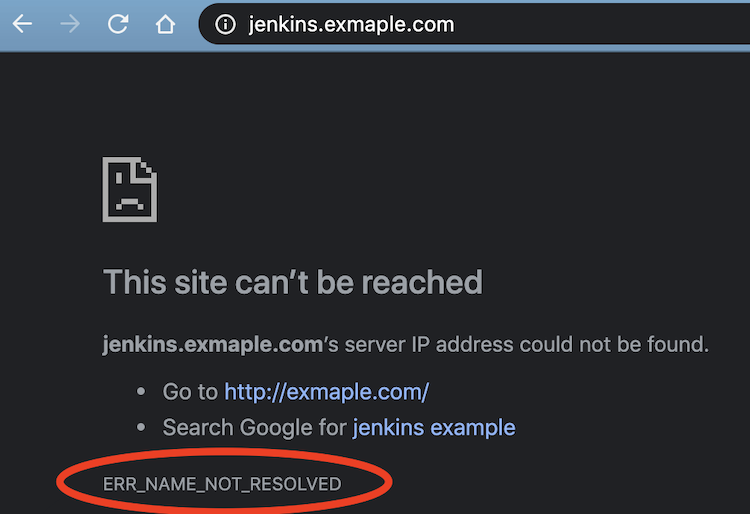
If you’re sharing screenshots, annotate the screenshot to be explicit about what you need help with.
Logs
Logs are usually fundamental to problem solving. Remember that you can often increase logging verbosity in many systems and tools to get more output. It can be a double-edged sword because it can make it harder to find signal in the noise, but usually more info is better. And if you’ve increased the logging verbosity in a running system, remember to decrease it after the debugging is done!
Isolate the Problem
Isolating the problem can severely reduce the time it takes to help you.
Let others know what you’ve tried already. That gives them more information and can stop them from chasing a red herring.
If you can reproduce the problem reliably and provide the steps to do so, you’re already most of the way to solving it. Those steps will help others get up to speed quickly and get you the help you need. It’s best if you can provide code or commands that can be executed to reproduce it.
Even isolating the problem at a coarse level can be beneficial. Providing information about whether it’s the database, network, API, or some other layer or component can save time.
Solve the Problem Loudly
Others may not be able to help right away but if you keep writing out the debugging steps you’re doing in chat, it can be a big benefit to yourself (you’re basically rubber duck debugging) and others when they have time to help. You might even solve the problem yourself and be the one who helps whoever comes along next! The more text you provide, the more likely you are to find the issue when searching back through chat history.
Whatever happens, make sure the resolution gets recorded. Don’t leave the debugging thread dangling. There’s a good chance your future self will thank you.
Don’t be afraid to post to stackoverflow.com if you can’t find the answer within your four walls.
Related Work
- Julia Evans: How to ask good questions
- Jon Skeet: Writing the perfect question
- Eric S. Raymond: How To Ask Questions The Smart Way
- Myself: Write That Request For Help, But Don’t Send It…Yet
- StackOverflow: How do I ask a good question?
- Wikipedia: rubber duck debugging
- nohello: nohello.net
Coda
The throughline here is respect for the helper’s time. Every question you ask is an addition to someone else’s cognitive load. Making it a good question is how you make that worthwhile. The effort you put into asking well is directly proportional to the quality of help you’ll receive. And when you’re on the other side of the table, you’ll appreciate it all the more.